October 30, 2026
How to Launch Multiple Google Business Profiles and Own More of the Map
Multiple Google Business Profiles, step by step: the account, phone, page, service areas and video verification each new office needs to win its own map.
Part of our guide: google business profile for contractors
TL;DR: Multiple Google Business Profiles are the fastest way to show up on the map across a whole metro. Every real, staffed office gets its own pin and its own ranking radius. Launch each one like its own business: a separate Google account, a local phone number, its own page on your site, its own service areas that don’t overlap, a clean video verification, then a steady flow of photos and reviews.
Here’s what every growing home service owner wants: when somebody across town searches “AC repair” or “emergency plumber,” your company shows up on the map. Not just near your shop. Everywhere you work.
One profile can’t do that. Google ranks map results heavily on distance, so a single profile wins its own neighborhood and fades out as the searcher gets farther away. The owners who own a whole metro do it with more pins: one Google Business Profile for every real office, each set up to win its own area.
I’ve watched plenty of contractors open a second office and then launch the profile wrong. Same phone number, same homepage link, same list of cities, all owned by one personal Gmail. The profile limps along or gets flagged. Set up right, a new office can start pulling its own calls.
This post is the launch playbook: the order of steps, what each profile needs, how to pass video verification, and how to protect every profile you build. This is part of our guide to Google Business Profile for contractors.
Why are multiple Google Business Profiles the fastest way to win more of the map?
Multiple Google Business Profiles win more of the map because Google ranks local results heavily on how close a business is to the person searching, so every real, staffed office you add gives you a new pin, a new ranking radius and a new set of nearby homeowners who see you first.
Google says local results are based mainly on relevance, distance and prominence. You can improve relevance and prominence with work. Distance you can only change by having another real location.
The experts agree. In Whitespark’s 2026 Local Search Ranking Factors, “proximity of address to the point of search” ranks as the number two map factor and “physical address in city of search” ranks number four. Only the primary category and keywords in the business name scored higher.
A BrightLocal recap of a 2025 expert panel with Joy Hawkins and Ben Fisher put numbers on it: service-area businesses “rank, on average, within a two-mile radius of their address,” while a storefront location “can rank anywhere from five to ten miles away.”
Picture an HVAC company based in Sacramento that opens a real office in Roseville with two techs and a van. That office gets its own profile, its own radius and its own shot at every “furnace repair” search in Roseville that the Sacramento profile was too far away to win.
There’s a second payoff. Every profile is also a record that AI tools can check. BrightLocal’s 2026 consumer survey found 45% of consumers now use AI tools for local business recommendations, up from 6% the year before. A well-built profile in each city gives ChatGPT and Gemini something to point to when someone asks for a roofer in that town. We cover that side in how to show up in ChatGPT.
How do you launch a new Google Business Profile step by step?
Launch a new Google Business Profile in this order: confirm the office is real and staffed, create a Google account just for it, give it a local phone number, build its page on your website, then create the profile, verify it by video and start loading it with photos and reviews.
Order matters. If you build the profile first and scramble for a phone number and a page later, the profile goes live thin and inconsistent. Here’s the sequence we use:
- Lock in the office. A signed lease, staff working out of it during business hours, and trucks or equipment that live there. Google allows one profile per location for service businesses “with separate service areas and separate staff at each location,” per its Business Profile guidelines. Run the second-location test in our pillar guide before you sign anything.
- Create a Google account for this office. Use a company email like [email protected]. More on why below.
- Get a local phone number that rings that office. Google wants a number “that connects to your individual business location” and one that is “under the direct control of the business.”
- Build the location page on your website: the office address, the cities it serves, the services it runs, the crew and real job photos. Google asks for a website “that represents your individual business location,” so link the profile here, not to your homepage.
- Create the profile under the new account. Use your real business name, the same one on your trucks. Pick the same primary category your main office uses. If you don’t serve customers at the office, hide the address and add service areas.
- Verify it. For most new profiles that means a live video. We break down exactly what to film in the last section.
- Load it up. Services, hours, the first photos and post, and a review link your techs send the day each job wraps.
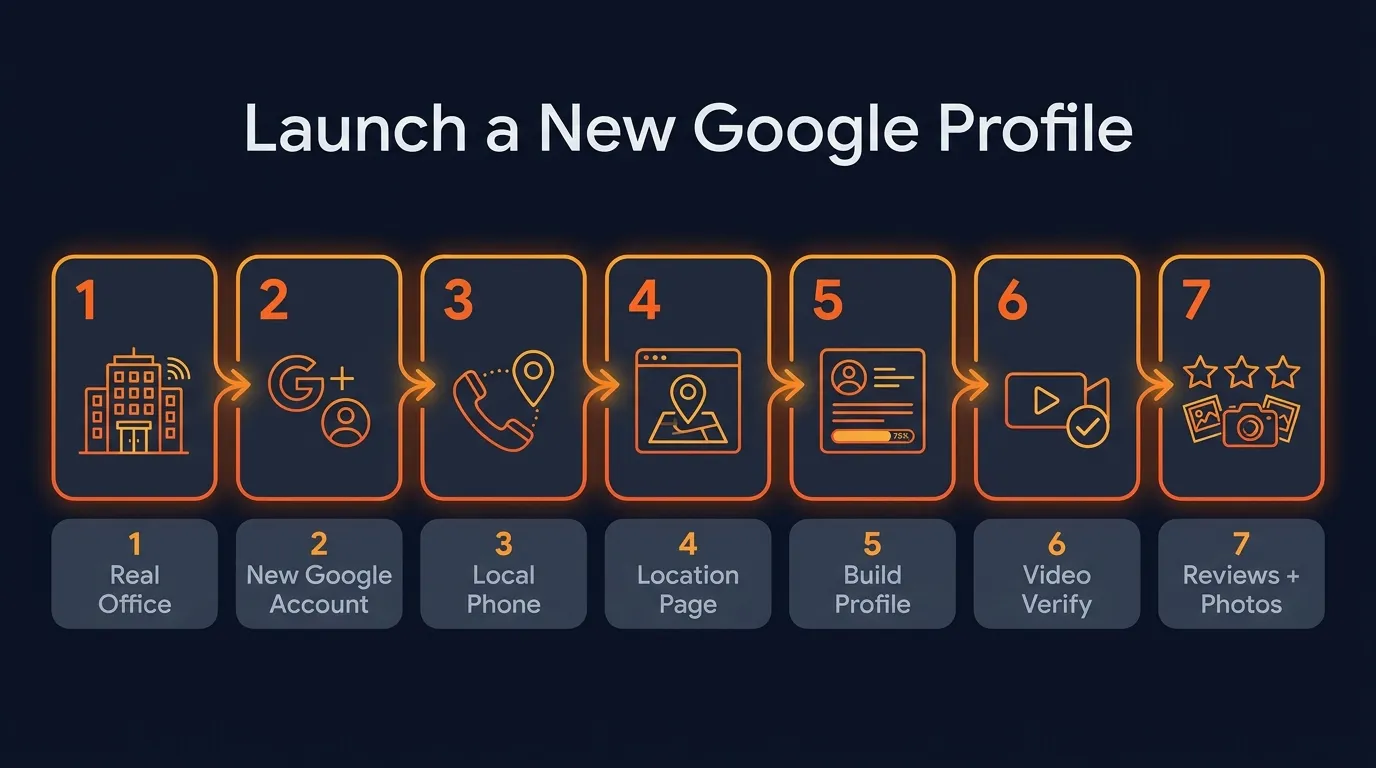 Seven steps, in order. Skipping ahead is how profiles go live thin.
Why should every profile have its own email and Google account?
Every profile should have its own email and Google account because Google can suspend profiles at the account level. Its policy says that if an account is restricted, all Business Profiles associated with that account will be suspended, so one owner account per office keeps a problem in one place.
That line is right in Google’s policy overview: “If a merchant’s account is restricted, all Business Profiles associated with that account will be suspended.” The same page says the account “must be reinstated before” the profile can be. Put five offices under one personal Gmail and one bad day puts all five at risk.
How to set it up safely:
- A company email per office. roseville@, folsom@, elkgrove@ on your own domain. You control them, and they don’t walk out the door when an employee leaves.
- Keep yourself as owner. Google’s owner and manager roles are clear: owners have “full control,” while managers have mostly the same access except “they can’t add or remove users or remove the profile.” Give your office manager or marketing team manager access. Keep ownership with the company.
- Be careful with business groups. Google recommends business groups for managing several profiles, and they’re handy. Just know that anyone added as an owner or manager to the group “can access all current and future profiles placed in the group.” Add people on purpose.
- Write it down. A simple sheet with each office’s account, owner, managers, phone number and page. When something breaks, you fix it in minutes instead of days.
“The multi-location setups we take over usually look the same: every profile owned by the owner’s personal Gmail, one phone number on all of them, and every profile pointing at the homepage. We rebuild each office like its own small business, with its own account, its own number, its own page and its own cities. That’s the setup that lets a new office start earning its own calls instead of fighting the main one.” Santino Velci
What should each profile have that the others do not?
Each profile needs its own location or service areas, its own local phone number, its own page on your website, its own job photos and its own reviews, while the business name, brand and primary category stay the same across every office.
Think of it this way: the brand is shared, the proof is local.
| Item | Same on every profile | Unique to each office |
|---|---|---|
| Business name | Yes, your real name | Never add a city to the name |
| Primary category | Usually yes | Only differs if the office truly does different work |
| Phone number | No | Local number that rings that office |
| Website link | No | That office’s location page |
| Service areas | No | Up to 20 areas, no overlap with your other profiles |
| Photos and posts | No | Jobs from that office’s area |
| Reviews | No | Customers that office served |
A few details that make the difference:
Service areas. Google lets you set up to 20 service areas, not as a radius, and your overall area “shouldn’t be more than about 2 hours of driving time” from the office. Split your cities cleanly. Whitespark’s experts rated “overlapping service areas on multiple-location GBPs” as one of the top suspension risks in the whole survey. A roofer with offices in Mesa and Glendale gives Mesa the east valley towns and Glendale the west. No town on both.
Phone numbers and tracking. You want to know which office’s profile is making the phone ring. Whitespark’s Darren Shaw recommends putting the call tracking number in the “Primary phone” field and the real office number in the first “Additional phone” field, so your listings stay consistent across the web.
The name. Keep it the name you actually use. Google’s guidelines say adding unnecessary information to the name “could result in the suspension of your Business Profile,” and location details are on the list of things not to add. “Smith Plumbing” in both cities, not “Smith Plumbing Folsom.”
Listings beyond Google. Give each office a matching listing on Bing Places and Apple Business Connect with the same name, address, phone and page. Matching details across the web are what let AI tools confirm each office is real. That’s the backbone of local SEO for contractors, done once per location.
How many profiles can one business run?
A business can run as many Google Business Profiles as it has real locations with separate staff and separate service areas. Google doesn’t set a fixed number. It sets the rule per location, and it bans more than one profile for the same location, in one account or across several.
The exact wording from Google’s guidelines: “Do not create more than one page for each location of your business, either in a single account or multiple accounts.” So the real question is how many offices you can staff, and the answer to growth is simple. Open real offices where the calls are, then give each one a profile.
A few practical notes as you scale:
- Plan for one-at-a-time verification. Google’s bulk verification needs 10 or more locations of the same business, and it isn’t open to service-area businesses. Most contractors hide their address, so plan on verifying each new office on its own.
- Grow where the demand is. Look at where your calls already come from and where your current profile stops ranking. That edge is where the next office pays off fastest.
- Keep every office inside the 2-hour rule. Each profile’s area is measured from that office, which is another reason a real office in a new county beats stretching one profile thin.
For a plumber, that might mean three offices across one metro. For a restoration company covering a big region, it might mean eight. The number comes from your real footprint.
How long until a new profile starts bringing in calls?
A new profile can be live within days, since Google says verification reviews take up to 5 business days, but calls build over the following weeks and months as the profile collects reviews, photos and activity in its own service area. Passing verification the first time is the fastest start you can give it.
Nail the video verification
Google picks the verification method for you, and when video is offered, Google itself recommends it. Google’s video verification rules for a service-area business:
- Record it live. At least 30 seconds, one unedited take. Pre-recorded uploads aren’t allowed.
- Show where you operate. Street signs or nearby landmarks around the office address.
- Show the business exists. Your tools, equipment and work materials.
- Show you’re in charge. Google’s own example is “unlocking a van that has your business branding.” A business permit, invoice or utility bill that matches the profile name also works.
- Leave out other people’s faces and sensitive numbers like bank or tax IDs.
Good news for contractors: the experts in that BrightLocal recap noted that if you’re a service-area business with a hidden address, you don’t need to show signage in the video. And if a video gets rejected, Google says you can record a new one and it will share the reasons the first one failed.
 The van, the tools and the street around the office: the proof Google asks to see.
Then feed it every week
Once it’s verified, the new profile needs the same things that make any profile rank, just for its own area. In Whitespark’s 2026 report, high star ratings, the number of Google reviews and how recent those reviews are all sit inside the top 11 map factors. So:
- Send every customer that office serves a review link the same day the job finishes.
- Upload real job photos from that office’s area every week.
- Post weekly about local jobs and seasonal work, like AC tune-ups in spring.
- Make sure the number on that profile gets answered fast. My uncle once lost an $80,000 job over one missed call, and a brand new profile can’t afford many of those.
Want calls faster while the map builds? Many owners run Local Services Ads for the new area at the same time, so the phone rings from day one.
Put your next office on the map
Multiple profiles are how a home service business goes from owning one neighborhood to owning a metro. Get the setup right once, and every new office you open gets its own pin, its own calls and its own reviews. Our guide to home service marketing shows how this fits with ads and your website.
At Ignite Systems, we manage every Google Business Profile a business has. Multi-location businesses get each real office treated as its own profile, with its own tracking number and its own page, plus weekly posts, geotagged job photos and a steady review flow. Nobody can honestly guarantee the number one spot, but we control the work, and you see every profile, post and ranking.
Book a Strategy Call. We’ll pull up your business live and show you where every profile ranks today, and where your next office could win.