October 27, 2026
Local Services Ads: How Pay Per Lead Really Works for Home Service Businesses
Local Services Ads charge per lead, not per click. What leads cost by trade, the Google Verified badge, how ranking works and the 2026 move to Google Ads.
TL;DR: Local Services Ads put your business at the top of Google for searches like “plumber near me,” and you pay for a lead, not a click. That sounds simple, but the real cost of a lead is decided after the phone rings. How fast you answer, which job types and towns you switch on, and how Google credits junk leads decide whether LSA makes you money or just burns budget.
Local Services Ads (LSA) are the boxes at the very top of Google with a business name, a star rating and a green check badge. For a lot of plumbers, HVAC companies and roofers, they are the first thing a homeowner sees when something breaks.
Most owners I talk to have tried LSA. Some love it. Some quit after a month of calls about jobs they don’t do. The difference is rarely the ad. LSA has no ad copy and no keywords. Google decides when you show based on your profile, your settings and how you handle leads.
That is why I think of LSA as a phone system with a price tag on every ring. The money is made or lost after the call comes in.
This guide covers what leads cost by trade, the Google Verified badge that replaced Google Guaranteed, how ranking and lead credits work now, how LSA fits next to Google Ads, and the big 2026 change: LSA is moving inside Google Ads. If you are newer to local marketing as a whole, start with our home service marketing guide and come back.
What are Google Local Services Ads?
Google Local Services Ads are pay per lead ads at the top of Google Search and Google Maps for local service searches, where customers call, message or book you straight from the ad and you pay only for valid leads tied to your services, not for clicks or views.
Google’s own Local Services Ads overview says leads “come in as phone calls and messages sent through your Local Services ad,” and that you “pay only for leads related to your business and the services you offer.”
There are no keywords in LSA. You pick your business category, the job types you handle and the areas you serve. Google matches you to searches from there.
What counts as a lead you pay for?
Google’s How leads work page lists the charged leads. You pay when:
- You answer a call, or call the customer back and talk to them.
- You miss a call during your listed business hours and the caller stays on the line more than 20 seconds.
- You get a text, email or voicemail from the customer.
- You get a booking request (US and Canada).
Two details matter a lot here. First, a missed call during your hours still costs you. Second, once a lead is charged, follow up calls or messages from the same number or email are not charged again as long as you talk within 15 days.
The 2026 change: LSA moves into Google Ads
Google is retiring the separate LSA dashboard. Per Google’s migration notice, the first phase started in August 2026 for select US home and storefront service advertisers, with more categories following through late 2026 and into 2027. LSA becomes a Performance Max campaign with a pay per lead goal.
What stays the same: you still pay only for valid leads, and the ads still show only on Google Search and Google Maps. What changes: you manage it inside Google Ads, your weekly budget gets divided by 7 into a daily budget, manual bidding goes away, and your Google Business Profile details sync to the campaign. Google also says old performance reports will not transfer, so download your history before your account moves.
That sync makes your profile even more important. If your categories, hours or photos are off, the ads inherit the mistake. Our Google Business Profile guide for contractors walks through getting it right.
How much does a Local Services Ads lead cost?
A Local Services Ads lead ran from about $34 to $162 across home service trades in one agency’s data from 100+ accounts, and your price can land well outside that. Roofing sits near the top, while painting, landscaping and locksmith leads run cheaper. Location, job type and bidding mode set the price.
Google does not publish lead prices. Its How leads work page says cost depends on “location, job type, service type, and your bidding mode,” and that message leads often cost less than calls but not always.
The best public numbers come from agencies that run a lot of accounts. The Media Captain shared LSA cost per lead from 100+ of its clients in August 2025. For comparison, LocaliQ published search ad cost per lead for home services from April 2024 to March 2025.
| Trade | LSA cost per lead (The Media Captain) | Search ads cost per lead (LocaliQ) |
|---|---|---|
| Plumbing | $69 | $129.02 |
| HVAC / air conditioning | $80 | $127.74 |
| Roofing | $162 | $228.15 |
| Painting | $40 | $138.38 |
| Landscaping | $39 | $117.92 |
Treat these as ballparks. They are two different data sets from different years, and your market can land well above or below them. A roofer in a storm belt in May will not pay what a roofer in a quiet suburb pays in January.
Why the posted price is not your real cost
The number Google shows you is cost per lead. The number that matters is cost per booked job: what you spent, divided by the jobs you actually closed.
Picture two HVAC companies paying the same $80 a lead. One answers every call in three rings and books half of them. The other lets a third of calls go to voicemail and books one in five. The first is paying about $160 per booked job. The second is paying about $400 for the exact same leads.
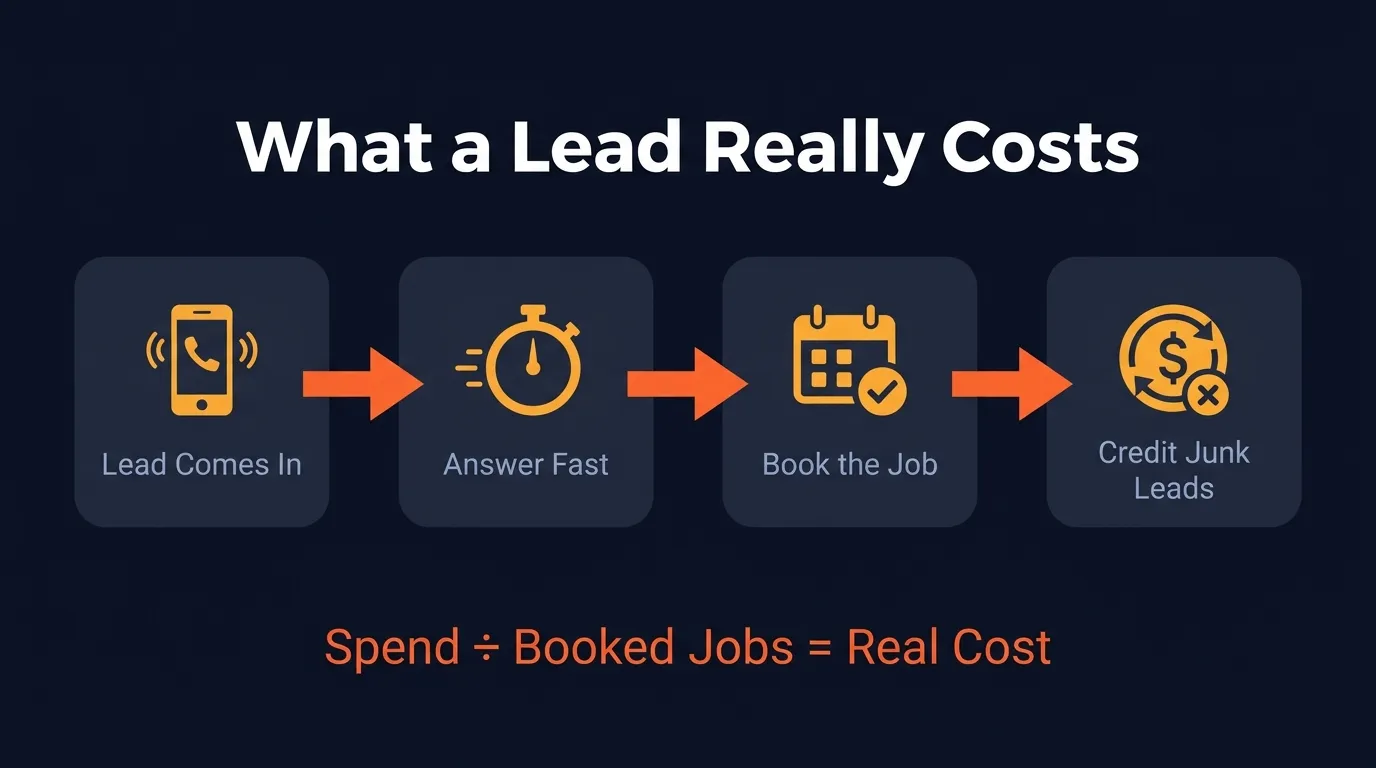 Your real cost per lead is total spend divided by booked jobs, after credits and missed calls.
Budgets and bidding
You set a weekly budget, and Google’s bidding guide explains three modes: Maximize Leads (Google sets the bid), Target Cost Per Lead, and Max Per Lead (you cap the price). Google recommends Maximize Leads, and with the move into Performance Max, manual bidding and vertical level target CPA are being phased out. Start with a budget you can live with for a full month. A week of data in one town tells you very little.
Job types and service areas set the price too
Every job type you switch on is a door for leads. If you are a plumber who does not do septic work, turn septic off. If you will not drive 45 minutes for a drain clog, pull that town out of your service area. This matters more now, because Google no longer credits leads for jobs or areas you do not serve (more on that below). Your settings are your filter.
What happened to Google Guaranteed and Google Screened?
Google Guaranteed and Google Screened no longer exist: on October 20, 2025, Google replaced them, along with the License Verified by Google badge, with one Google Verified badge for all Local Services advertisers, and it ended the Money Back Guarantee that came with Google Guaranteed.
Search Engine Roundtable reported the change with Google’s wording: it was “simplifying badging by launching a single, more cohesive Google Verified badge for all advertisers.” Google’s own LSA overview now says businesses with the badge have “passed Google’s proprietary screening process.” If you still see “Google Guaranteed” on an agency’s sales page, that page is out of date.
How to get Google Verified
Google’s screening and verification requirements vary by trade and state, but for home services they generally include:
- Business owner identity verification, plus fieldworker checks in some categories.
- Business registration for the company and its representative.
- License checks where your state or trade requires a license.
- Insurance, with the type and amount depending on the service.
- A public, verified Google Business Profile.
Google says the process takes 3 to 4 weeks on average after you submit documents, so start the day you open the account. In our experience, applications stall on two things: a license name that does not match the business name, and insurance certificates that are missing the right coverage. Get those lined up before you apply.
The LSA overview also mentions “pre-badge ads,” which let some businesses receive leads while they finish onboarding. Google says pre-badge ads are not available for garage door or locksmith services.
How does Google decide who shows first in Local Services Ads?
Google ranks Local Services Ads in an auction that weighs your bid against how likely your ad is to produce a lead, which comes from your responsiveness to calls and messages, what the customer searched for (job, time and location), and profile quality such as ratings, reviews, response time and photos.
That is straight from Google’s About ad rankings page. A few things stand out for owners:
- Responsiveness is a ranking factor. Google says “missed calls may negatively affect your responsiveness.” Every unanswered call costs you the lead and pushes you down for the next one.
- Messages and bookings help. Google recommends turning on message and booking leads so customers have more ways to reach you.
- Reviews count. Ratings and reviews are part of profile quality. A roofer with 40 recent reviews has an edge over one with 6 from three years ago.
- Location and timing are part of the search context. A 2am burst pipe search near your shop is a different auction than a weekday afternoon search across town.
- Multiple locations do not stack. If you have several locations serving the same area, Google shows only your highest ranking ad.
 Fast answers are part of how Google ranks you, not just how you win the job.
Set hours you will actually answer
Because Google charges for missed calls during your listed business hours, your hours setting is a money setting. If you list 24/7, someone has to pick up at 2am, or a service has to. If nobody will, list the hours you really cover. A water damage company that answers every night call should absolutely list 24/7. A remodeler who returns calls the next morning should not.
“The LSA accounts we see paying the most per booked job are rarely the ones with the highest lead price. They are the ones where calls ring out at dinner time, half the job types are switched on by default, and nobody checks the lead list until Friday. Fix the phone and the settings first. The bid is the last thing I touch.” Santino Velci
This is personal for me. My uncle once lost an $80,000 job because of one missed call. With LSA, a missed call costs you twice: you pay for it, and your ranking slips.
Can you get credit back for bad leads?
Yes, you can still get credit for bad leads, but it is automatic now: Google reviews every lead, credits the ones its models judge invalid or low quality, usually within 30 days, and no longer credits “job type not serviced” or “geo not serviced” leads. Wrong-trade and wrong-area calls are on your settings.
Google’s lead credits page explains that leads are assessed when the customer first makes contact, and charged leads “get reassessed by our models over time, and may be issued credits automatically if later determined to be low quality.”
So what can you still do about junk leads?
- Tighten job types and service areas. This is the big one. Since those two credit reasons are gone, every job type you leave on is a lead you might pay for.
- Use the lead list. Review leads every week. If spam, robocalls or sales pitches keep showing up as charged leads and never get credited, that is a pattern worth raising with Google support.
- Track credits. The Media Captain reports its clients typically get 6 to 7% of LSA spend back in credits. If you are getting far less while seeing plenty of junk, look closer.
- Do not count credits as a strategy. A credit gives you money back. It does not give you the time your office spent on a bad call.
Should a home service business run Local Services Ads and Google Ads together?
Most home service businesses should run both, with Local Services Ads winning the top of the page for urgent searches at a price per lead, and Google search ads covering the job types, towns and searches LSA will not show for, sending people to a specific page.
Here is how they compare:
| Local Services Ads | Google search ads | |
|---|---|---|
| You pay for | A valid lead | A click |
| Keywords | None, Google matches by category and job type | You choose them |
| Where it shows | Top of Search and Maps | Search results, below LSA |
| Landing page | Your LSA profile | Any page on your site |
| Best for | Urgent jobs you do every day | Specific services, bigger jobs, towns LSA misses |
Some real examples:
- A plumber lets LSA handle “emergency plumber” and “water heater repair,” and runs search ads for “tankless water heater installation,” which is a bigger ticket job with its own landing page.
- An HVAC company uses LSA for AC repair during the summer rush, and search ads for new system replacement and financing searches.
- A roofer runs LSA for “roof repair” and search ads for “roof replacement cost” and insurance claim searches, which need more explaining than an LSA profile allows.
The one rule: track them separately. Use different phone numbers so you know which channel each call came from, and compare cost per booked job, not cost per lead or cost per click.
Neither channel replaces organic rankings. When the ads budget pauses, your map listing and website keep working. Our local SEO guide for contractors covers that side.
Want to know what your LSA leads really cost?
LSA rewards the businesses that answer fast, keep tight settings and keep a strong profile. Ignite Systems manages Local Services Ads and Google Ads for home service businesses as part of one system: budgets, job types, service areas and lead disputes, plus call tracking numbers so you can see which channel each call came from, and a 24/7 AI receptionist that answers every call, day or night.
Nobody can guarantee you the top spot, and we will not pretend to. What we can do is show you where you stand.
Book a Strategy Call and we will pull up your business live and show you where it ranks today.